
1. Track what is easy to forget
Start with the items that create a real problem when their date passes. These are often things stored at the back of a shelf, bought in bulk, used only occasionally, or needed at a specific moment. A short working list is easier to trust than an exhaustive home inventory that you stop maintaining.
A practical first list might include:
- food and pantry items that are hidden, expensive, or bought in multiples;
- medicines and first-aid supplies, following their labels and professional advice;
- personal-care, baby, and pet products with printed dates;
- warranties, licences, identity documents, and memberships that need renewal;
- household supplies whose replacement takes time to arrange.
Leave out items you already check naturally or consume quickly. You can expand the system after the first review shows that it is helping.
2. Record enough detail to recognize the item
Every entry needs a clear name and the date printed on the item. Add a category or storage place when similar names could be confusing. If a package contains a second instruction such as “use within 30 days of opening,” record the opening date separately in a system that supports notes. Do not silently replace a printed date with an estimate.
For most household items, the useful fields are:
- Name: specific enough to identify the exact item.
- Category or location: where you would look for it.
- Date and label wording: copied exactly from the package.
- Reminder date: the day you still have time to act.
- Photo or note: optional context when the name is not enough.
ExpiryNotifier uses a category, item name, expiry date, reminder date and time, and a photo. The app validates that the reminder is not after the expiry date. Its saved item records are currently read only, so review the details before saving. The item requirements and current limitations are documented on the Features page.
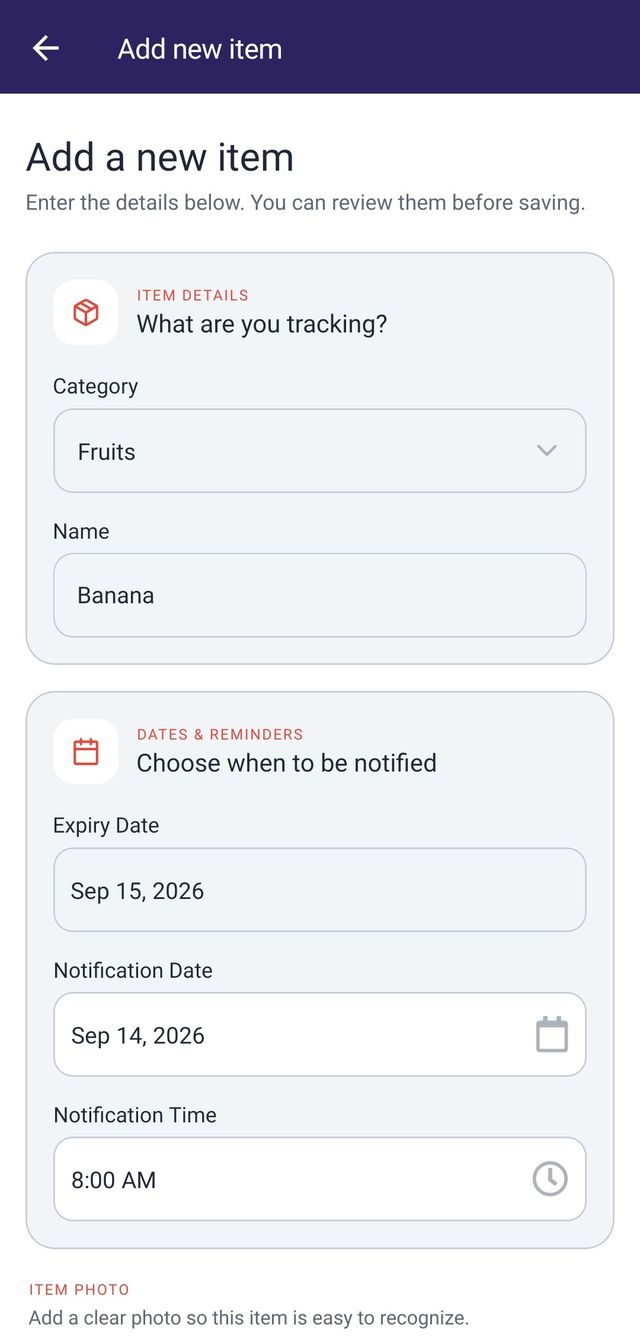
3. Set the reminder for the action, not the deadline
The best reminder date depends on what you need to do. Work backward from the action. If you want to use an ingredient, allow enough time to include it in a meal. If you need to replace a product, include shopping or delivery time. If a document must be renewed, allow for forms, appointments, and processing.
Use these questions to choose the lead time:
- What will I do when the reminder appears?
- How long does that action normally take?
- Would a second visual check be sensible before the printed date?
- Will the reminder arrive at a time when I can actually respond?
A reminder is useful only if notifications are allowed and the device can schedule it. ExpiryNotifier schedules reminders locally and reports when notification or Android alarm access needs attention. See how app reminders work and the notification troubleshooting steps.
4. Put the next date at the top
A list is useful when it answers “what needs attention next?” without extra searching. Sort by date rather than entry order. Keep the nearest date visible, then group the rest into simple windows such as today, the next seven days, and the next 30 days.
A weekly review is a practical default for active household items. Look at the next seven days, decide what to use or replace, and check that the corresponding item is still where the list says it is. A monthly review can catch slower-moving supplies and documents. Adjust the rhythm to the kind of items you track.
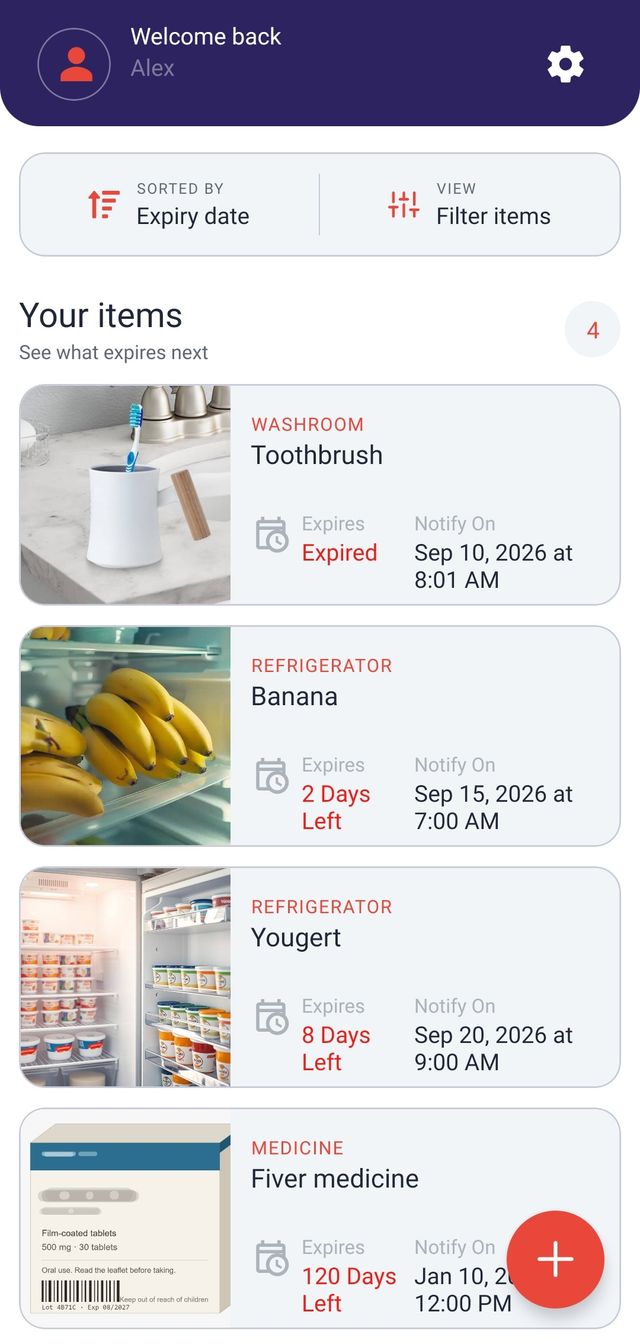
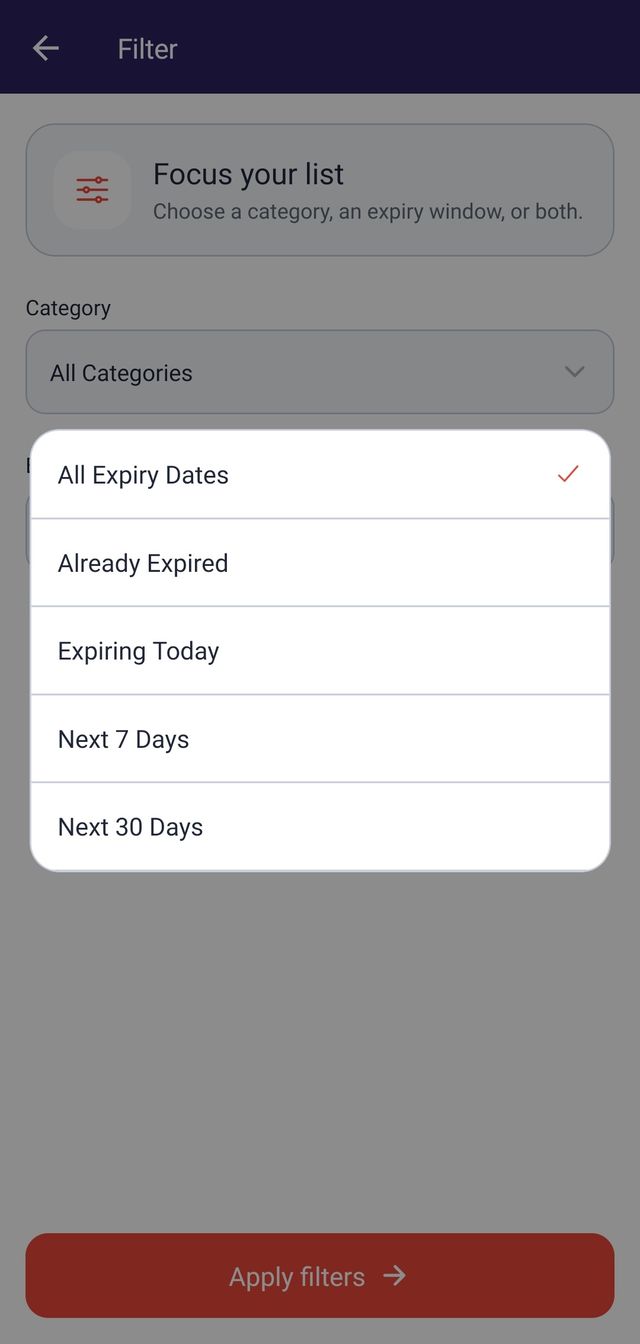
ExpiryNotifier offers those same expiry windows and can combine them with a category filter. The filtering guide explains the available views. For a broader review, the app also provides expiry and reminder reports that can be previewed and exported.
5. Match the list with the physical shelf
Digital reminders cannot help if the item is buried or stored somewhere unexpected. Put the earliest date at the front of each group and place newer duplicates behind it. Keep similar items together, and make dates easier to see without covering the original label. When you move an item, update its location in whatever system you use.
For a paper system, a small list on the cupboard or refrigerator may be enough. For a spreadsheet, sort rows by date and keep one shared definition for each category. For a calendar, use a consistent event name that starts with the item. The method matters less than keeping one dependable source instead of scattering dates across notes and apps.
6. Read the date label before deciding what it means
“Best before,” “sell by,” “use by,” and “expiration” do not always mean the same thing. Their meaning depends on the product and local rules. A tracker should preserve what the label says; it should not turn every printed date into a safety decision.
In the United States, the USDA food product dating guidance explains that many food dates describe quality rather than safety, with a specific exception for infant formula. Medicine is different: the FDA expiration-date guidance ties drug dates to tested stability under labeled storage conditions. Other countries have their own rules, so follow the product label and the appropriate local authority.
Which expiration-date tracking method should you use?
Choose the simplest method that can handle your real list. A label or paper checklist is quick and visible. A calendar works for a handful of important dates. A spreadsheet is useful when you want custom columns and sorting. A dedicated tracker is helpful when photos, categories, date windows, and scheduled reminders are worth the entry time.
If you use ExpiryNotifier, begin with only a few high-value items and test one reminder before entering more. The app is available through Google Play and supports the workflow shown above. It does not scan barcodes, recognize dates from photos, or decide whether an item is safe. Its job is to store the details you enter, organize them, and schedule the reminder you choose.
Try the workflow with one item you are likely to forget.
Get ExpiryNotifier on Google PlayCommon expiration-tracking mistakes
- Tracking too much at once. Start with items that justify the effort, then expand only if you keep the list current.
- Setting every reminder on the printed date. Leave enough time for the action you expect to take.
- Using vague names. “Cream” or “document” may be meaningless when the alert appears months later.
- Mixing estimates with printed dates. Label estimates clearly and keep the original wording when accuracy matters.
- Treating a notification as a safety verdict. Always inspect the item and follow product-specific instructions.
- Ignoring the list after setup. A short weekly review is what turns stored dates into useful decisions.
Frequently asked questions
What is the best way to keep track of expiration dates?
Use one list for the items you are likely to forget, record the exact printed date, and set a reminder early enough to act. Sort the list by the next date and review a short upcoming window each week.
How far in advance should I set an expiration reminder?
Set the reminder according to the action you need to take. A food you plan to use may need a few days of notice, while a document renewal or replacement purchase may need several weeks. The reminder should leave enough time to act before the date.
Do I need to track every item in my home?
No. Start with items that are costly, important, easy to overlook, or stored out of sight. A smaller list that you maintain is more useful than a complete inventory that quickly becomes outdated.
Are best-before and expiration dates the same?
Not always. Date-label meanings depend on the product and country. For example, United States guidance treats many food dates as quality indicators, while medicine expiration dates relate to tested stability. Read the wording and instructions on the product itself.
Can I use a calendar for expiration dates?
Yes. A calendar works well for a small number of dates. A spreadsheet or dedicated tracker becomes more useful when you need categories, photos, sorting, filters, or a longer history.
Can an expiration tracker tell me whether something is safe to use?
No. A tracker can repeat a date and remind you to check an item, but it cannot inspect storage conditions, damage, spoilage, recalls, or professional instructions. Follow the product label and appropriate safety guidance.
Start with one shelf, not the whole house
Pick one cupboard, drawer, or document folder. Add only the items you would regret overlooking, set reminders that leave time to act, and review the nearest dates once a week. A small system you keep current will do more than a perfect inventory you abandon.